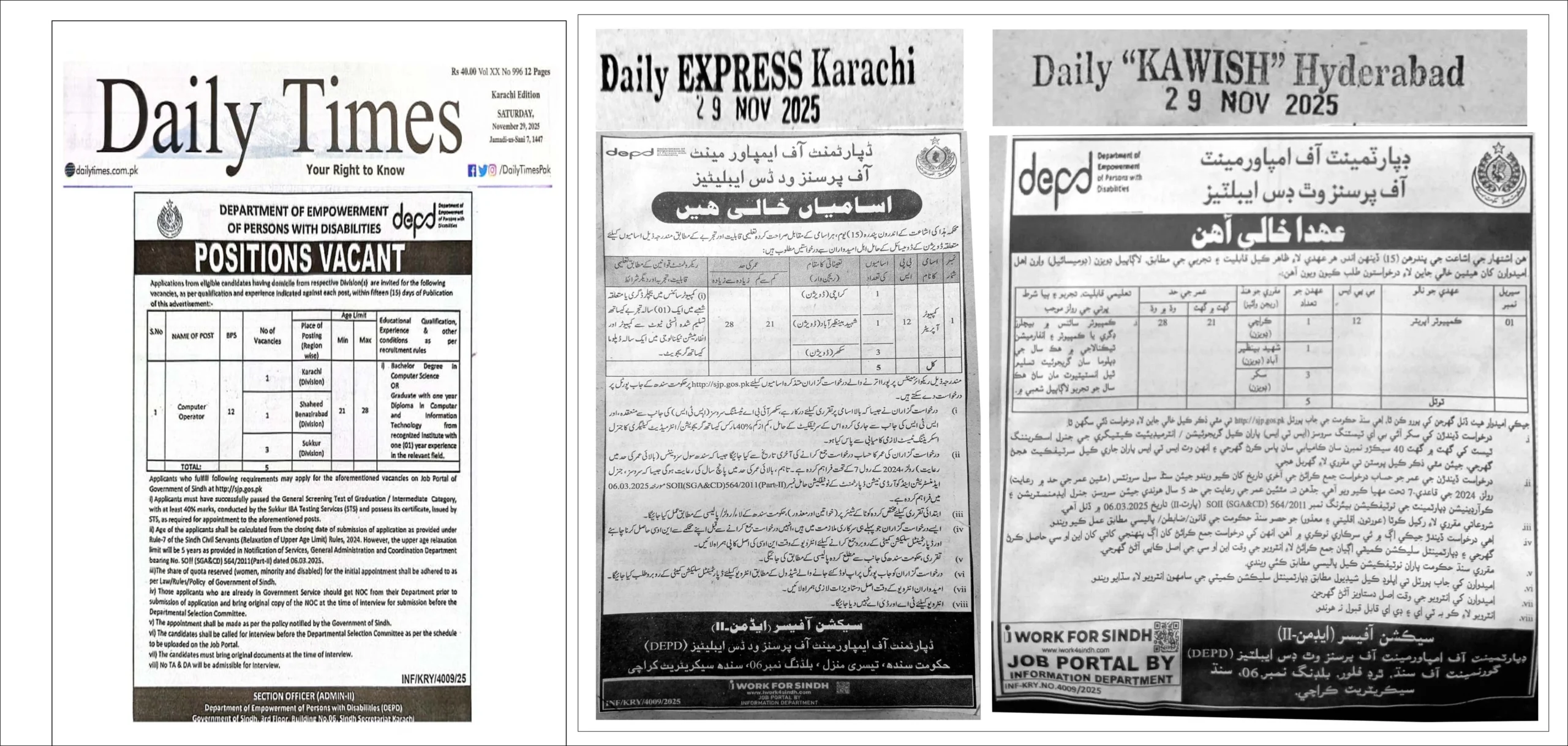
The Sindh Job Portal (sjp.gos.pk) is the official website for applying to Sindh Government Jobs 2025. Candidates can register online, create an account, and apply for vacancies across different departments in one place. The portal updates new jobs regularly, making it easy to search and submit applications. Only those who have passed the IBA Matric or Graduation Category Tests—with certificates issued on 8 November 2025—can create an SJP account and apply for government jobs. Just visit www.sjp.gos.pk, sign up, and start applying online.
Sjp.gos.pk Jobs 2025 Online Apply @Sjpportal.com
Sjp.gos.pk Jobs 2025 Online Apply allows candidates to easily apply for Sindh government vacancies through the official Sindh Job Portal. By visiting sjp.gos.pk or Sjpportal.com, applicants can create an account, check the latest job openings, and submit applications online. The portal provides a smooth and transparent process for anyone looking to apply for government jobs in Sindh.
Www.sjp.gos.pk Official Portal details
| Title | Official Links |
|---|---|
| SJP Sign Up | Sign Up |
| www.Sjp.gos.pk Login | Login |
| www.Sjp.gos.pk Application Form | Download From Here |
| SJP Roll No Slip 2025 | Download |
| SJP Project | Apply Online |
| Today New Government Jobs in Sindh Online Apply | Apply |
| How to Upload CV on the SJP Portal | Upload Here |
Latest Update on STS Test Validity and Age Relaxation Policy
The Sindh Job Portal has applied the new government instructions on STS test validity and age relaxation. The STS test results will now remain valid until 30 June 2028, and age will be counted from the closing date of applications. As per the notification issued on 2 December 2025, candidates of earlier STS tests can receive up to 15 years age relaxation, while applicants of the recent phases – Graduation 2nd Phase, Intermediate 2nd Phase, and Matric Revised – will get 5 years relaxation. These changes aim to create more fairness and opportunities for eligible candidates across Sindh.
SJP All New Upcoming Jobs Today 2025
The Sindh Jobs Portal (SJP) is expected to release new government job openings in 2025, with all vacancies to be posted on the official portal and updated on SJP.org.pk. Candidates should visit the website regularly to stay updated on new posts, eligibility criteria, and application deadlines. The next round of SJP job announcements is likely to be issued by late November 2025, so keep checking for official updates.
The Sindh Job Portal has listed several new government vacancies for 2025, including positions like Statistical Assistant, Survey Assistant, Senior Auditor, Junior Clerk, Computer Operator, and Assistant Food Controller. Each job card shows the age limit, STS category requirement, and last date to apply, making it easy for applicants to review details quickly.
Apply Online for Fresh Sindh Government Vacancies
Multiple departments, including the Sindh Food Department and Minimum Wages Board, have announced new openings on sjp.gos.pk. Candidates can check vacancies, read the full advertisement, and apply instantly through the Apply Now button. All positions clearly display the eligibility criteria and age limits for smooth application processing.
SJP Portal Job Cards 2025
The job cards on the Sindh Job Portal give complete details at a glance, such as the number of vacancies, job type, qualification requirements, and closing dates. This makes it easier for applicants to select suitable posts and submit their applications before the deadline.
SJP New Jobs Latest Dates
Most of the newly posted vacancies have a last date of December 18, 2025, so candidates are advised to apply as early as possible. The portal provides a transparent and user-friendly system for job seekers looking for reliable government employment opportunities.
How to Update Your Mobile Number on Your SJP Account?
Step 1: Access the Official Portal
Go to the Sindh Jobs Portal by visiting www.sjp.gos.pk.
Step 2: Log In
Sign in using your CNIC number and password.
Step 3: Navigate to Profile Settings
Click on your profile icon or select My Account from the menu.
Step 4: Update Your Mobile Number
Find the Mobile Number section and click Edit or Update.
Step 5: Enter Your New Number
Type in your new mobile number carefully.
Step 6: Save the Changes
Click Save or Update to confirm your new number.
Step 7: Verify with OTP (if prompted)
If an OTP is sent to your new number, enter it to complete the verification process.